
The project im working on has a specific map that serves as a main hub and I wanted to make an item that teleports the player back at some cost. For this purpose I created a common event that just changes the hero location to there but it keeps the menu open, fading in and out on the spot and only teleporting the player once the menu is manually closed. I wanted to make it so activating it closes the menu and then changes the location but I can't find how to. I tried disabling and enabling the menu but it did nothing and I don't see a "close menu" event like with the one to open it. Searching arround, I found a script that could do what I wanted:
Manager.Stack.pop(new Scene.Menu())
Manager.Stack.pop(new Scene.Menu())
However, using this has some issues of it's own. Using it after the player is moved automatically closes the menu but the effect still looks horrible while using it before stops the rest of the event from running entirely. Is there some other option I could use? Maybe a different script?
@sergiop90 I didn't test but your can do only Manager.Stack.pop(); Manager.Stack.pop(); What is the "horrible look" exactly?
The horrible look is that when using the item, the game will wait until the menu is closed to actually move the player but any transitions, sound effects, etc... will still play out. This means that the fade out effect plays, the fade in effect plays, the character snaps onto another map and the menu closes (intended behaviour due to the script being right at the end). If I instead change the script location to just before the teleport, you'd think the menu would close and then move the character but instead it will close the menu and then stop the reaction mid execution, meaning nothing moves.
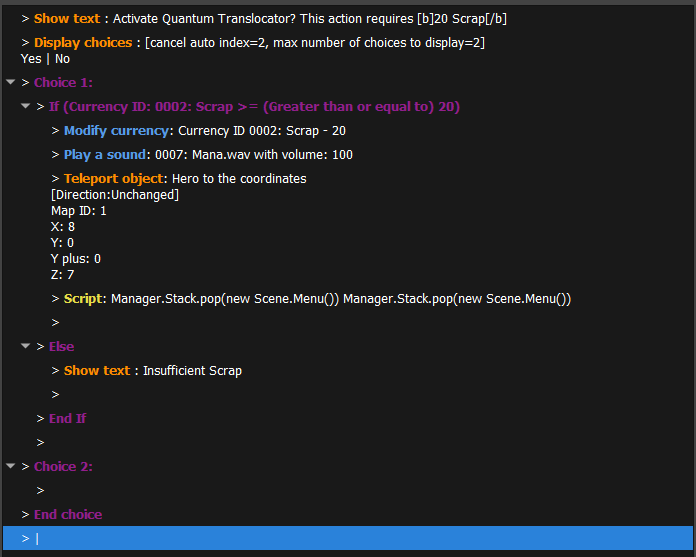
@sergiop90 I tried with this common event and it works as intended (show message a, + choice, if I press yes it closes menu and teleports + show message b once teleported)
@wano It seems to work. I did some testing and I think it has to do with the fade effects built in the move object function. The moment I put them, it behaves like I described. Also I tried your reaction and the b message is never shown. In fact, no function in the reaction will run after the teleport runs and in fact, putting something just before the teleport will break it again. From what im seeing it looks like after the script, the engine will run just one more function but the rest will be skipped. However, not every function will work as neither text not calling another common reaction do anything but I haven't tested all of them. All this means that while yes, I can make the item sorta work I can't make it look semi decent. It's a shame but from the looks of it I will have to implement the mechanic in some other way if I want it to look good. Thanks for the help anyway.